Simple workflow
The most simple workflow that you can write is a sequential pipeline of steps, where the outputs of a component are fed as input to the following component, employing a scikit-learn-like Pipeline.
Itwinai defines each step as a “component”. Components are implemented by extending the itwinai.components.BaseComponent class. Each component implements the execute(...) method, which provides a unified interface for interaction.
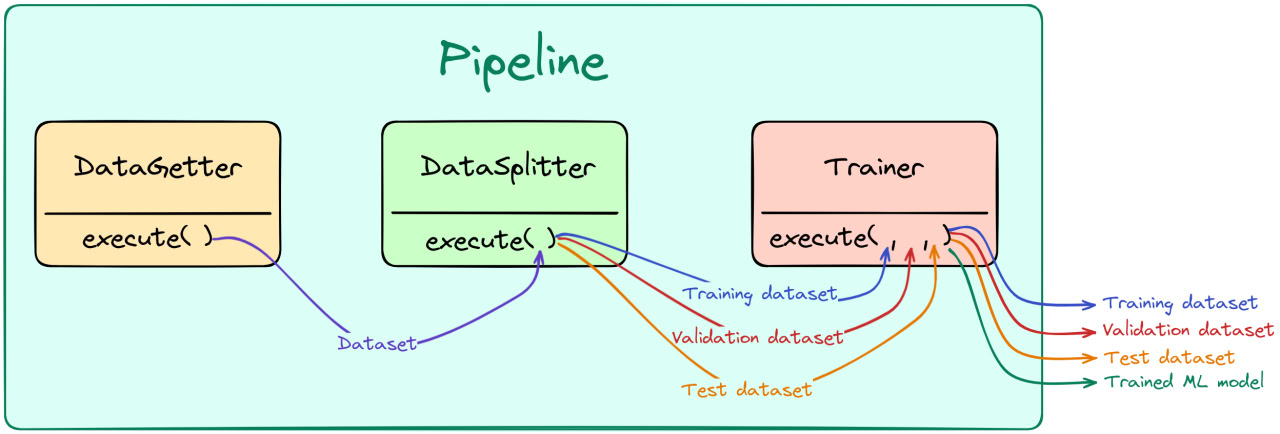
The aim of itwinai components is to provide reusable machine learning best practices. To this end, some common operations are already encoded in abstract components. Some examples are: - DataGetter: has no input and returns a dataset, collected from somewhere (e.g., downloaded). - DataSplitter: splits an input dataset into train, validation and test. - DataPreproc: perform preprocessing on train, validation, and test datasets. - Trainer: trains an ML model and returns the trained
model. - Saver: saved an ML artifact (e.g., dataset, model) to disk.
In this tutorial, you will see how to create new components and how they are assembled into sequential pipelines.
[1]:
from typing import List, Optional, Tuple

from itwinai.pipeline import Pipeline
from itwinai.components import DataGetter, DataSplitter, Trainer, monitor_exec
Creating dummy components
[2]:
class MyDataGetter(DataGetter):
    def __init__(self, data_size: int, name: Optional[str] = None) -> None:
        super().__init__(name)
        self.data_size = data_size
        self.save_parameters(data_size=data_size)

    @monitor_exec
    def execute(self) -> List[int]:
        """Return a list dataset.

        Returns:
            List[int]: dataset
        """
        return list(range(self.data_size))


class MyDatasetSplitter(DataSplitter):
    @monitor_exec
    def execute(
        self,
        dataset: List[int]
    ) -> Tuple[List[int], List[int], List[int]]:
        """Splits a list dataset into train, validation and test datasets.

        Args:
            dataset (List[int]): input list dataset.

        Returns:
            Tuple[List[int], List[int], List[int]]: train, validation, and
            test datasets respectively.
        """
        train_n = int(len(dataset)*self.train_proportion)
        valid_n = int(len(dataset)*self.validation_proportion)
        train_set = dataset[:train_n]
        vaild_set = dataset[train_n:train_n+valid_n]
        test_set = dataset[train_n+valid_n:]
        return train_set, vaild_set, test_set


class MyTrainer(Trainer):
    def __init__(self, lr: float = 1e-3, name: Optional[str] = None) -> None:
        super().__init__(name)
        self.save_parameters(name=name, lr=lr)

    @monitor_exec
    def execute(
        self,
        train_set: List[int],
        vaild_set: List[int],
        test_set: List[int]
    ) -> Tuple[List[int], List[int], List[int], str]:
        """Dummy ML trainer mocking a ML training algorithm.

        Args:
            train_set (List[int]): training dataset.
            vaild_set (List[int]): validation dataset.
            test_set (List[int]): test dataset.

        Returns:
            Tuple[List[int], List[int], List[int], str]: train, validation,
            test datasets, and trained model.
        """
        return train_set, vaild_set, test_set, "my_trained_model"
Running the pipeline
Here you can find a graphical representation of the pipeline implemented below:
[4]:
# Assemble them in a scikit-learn like pipeline
pipeline = Pipeline([
    MyDataGetter(data_size=100),
    MyDatasetSplitter(
        train_proportion=.5,
        validation_proportion=.25,
        test_proportion=0.25
    ),
    MyTrainer()
])

# Inspect steps
print(pipeline[0])
print(pipeline[2].name)
print(pipeline[1].train_proportion)

# Run pipeline
_, _, _, trained_model = pipeline.execute()
print("Trained model: ", trained_model)

# You can also create a Pipeline from a dict of components, which
# simplifies their retrieval by name
pipeline = Pipeline({
    "datagetter": MyDataGetter(data_size=100),
    "splitter": MyDatasetSplitter(
        train_proportion=.5,
        validation_proportion=.25,
        test_proportion=0.25
    ),
    "trainer": MyTrainer()
})

# Inspect steps
print(pipeline["datagetter"])
print(pipeline["trainer"].name)
print(pipeline["splitter"].train_proportion)

# Run pipeline
_, _, _, trained_model = pipeline.execute()
print("Trained model: ", trained_model)
<__main__.MyDataGetter object at 0x7f77c6fc17b0>
MyTrainer
0.5
#######################################
# Starting execution of 'Pipeline'... #
#######################################
###########################################
# Starting execution of 'MyDataGetter'... #
###########################################
#####################################
# 'MyDataGetter' executed in 0.000s #
#####################################
################################################
# Starting execution of 'MyDatasetSplitter'... #
################################################
##########################################
# 'MyDatasetSplitter' executed in 0.000s #
##########################################
########################################
# Starting execution of 'MyTrainer'... #
########################################
##################################
# 'MyTrainer' executed in 0.000s #
##################################
#################################
# 'Pipeline' executed in 0.006s #
#################################
Trained model:  my_trained_model
<__main__.MyDataGetter object at 0x7f77c7f51120>
MyTrainer
0.5
#######################################
# Starting execution of 'Pipeline'... #
#######################################
###########################################
# Starting execution of 'MyDataGetter'... #
###########################################
#####################################
# 'MyDataGetter' executed in 0.000s #
#####################################
################################################
# Starting execution of 'MyDatasetSplitter'... #
################################################
##########################################
# 'MyDatasetSplitter' executed in 0.000s #
##########################################
########################################
# Starting execution of 'MyTrainer'... #
########################################
##################################
# 'MyTrainer' executed in 0.000s #
##################################
#################################
# 'Pipeline' executed in 0.001s #
#################################
Trained model:  my_trained_model