Pipeline and configuration files
Author(s): Matteo Bunino (CERN)
In the previous tutorial we saw how to create new components and assemble them into a Pipeline for a simplified workflow execution. The Pipeline executes the components in the order in which they are given, assuming that the outputs of a component will fit as inputs of the following component. This is not always true, thus you can use the Adapter component to compensate for mismatches. This component allows users to define a policy to rearrange intermediate results between two components.
Moreover, it is good for reproducibility to keep track of the pipeline configuration used to achieve some outstanding ML results. It would be a shame to forget how you achieved state-of-the-art results!
itwinai allows to export the Pipeline form Python code to configuration file, to persist both parameters and workflow structure. Exporting to configuration file assumes that each component class resides in a separate python file, so that the pipeline configuration is agnostic from the current python script.
Once the Pipeline has been exported to configuration file (YAML), it can be executed directly from CLI:
itwinai exec-pipeline --config my-pipeline.yaml --override nested.key=42
The itwinai CLI allows for dynamic override of configuration fields, by means of nested key notation. Also list indices are supported:
itwinai exec-pipeline --config my-pipe.yaml --override nested.list.2.0=42
[1]:
from itwinai.pipeline import Pipeline
from itwinai.parser import ConfigParser
from itwinai.components import Adapter

# Now we are importing the components from an external module
from basic_components import MyDataGetter, MyDatasetSplitter, MyTrainer, MySaver
Running the pipeline
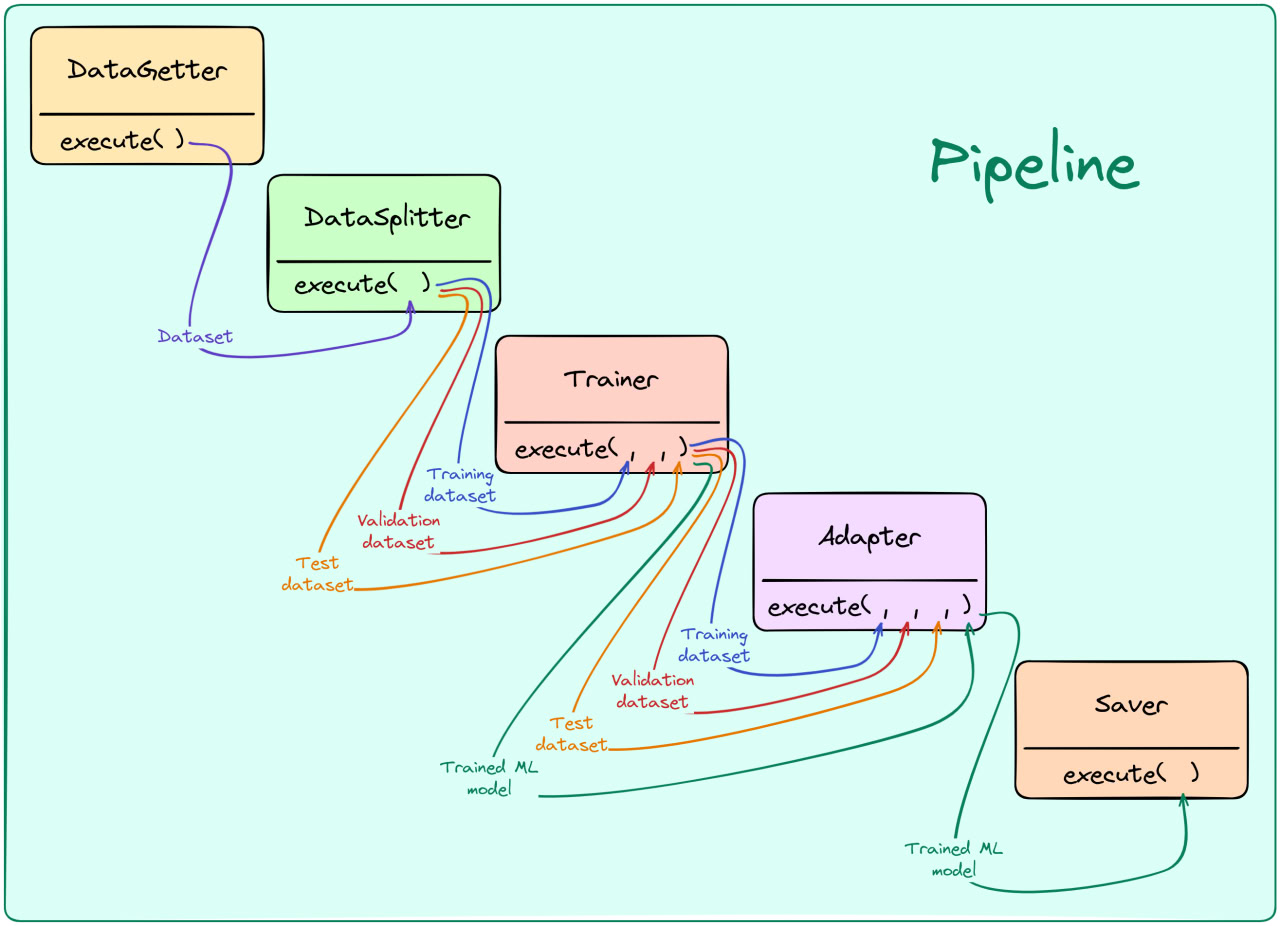
Here you can find a graphical representation of the pipeline implemented below.
Important!
Pipeline components can be serialized only when they are imported from an external file!
In this case, MyDataGetter, MyDatasetSplitter, and MyTrainer are imported from basic_components. Otherwise, the pipe serialization cannot be deserialized by another process.
[3]:
# In this pipeline, the MyTrainer produces 4 elements as output: train,
# validation, test datasets, and trained model. The Adapter selects the
# trained model only, and forwards it to the saver, which expects a single
# item as input.
pipeline = Pipeline([
    MyDataGetter(data_size=100),
    MyDatasetSplitter(
        train_proportion=.5,
        validation_proportion=.25,
        test_proportion=0.25
    ),
    MyTrainer(),
    Adapter(policy=[f"{Adapter.INPUT_PREFIX}-1"]),
    MySaver()
])

# Run pipeline
trained_model = pipeline.execute()
print("Trained model: ", trained_model)

# Serialize pipeline to YAML
pipeline.to_yaml("basic_pipeline_example.yaml", "pipeline")
#######################################
# Starting execution of 'Pipeline'... #
#######################################
###########################################
# Starting execution of 'MyDataGetter'... #
###########################################
#####################################
# 'MyDataGetter' executed in 0.000s #
#####################################
################################################
# Starting execution of 'MyDatasetSplitter'... #
################################################
##########################################
# 'MyDatasetSplitter' executed in 0.000s #
##########################################
########################################
# Starting execution of 'MyTrainer'... #
########################################
##################################
# 'MyTrainer' executed in 0.000s #
##################################
######################################
# Starting execution of 'Adapter'... #
######################################
################################
# 'Adapter' executed in 0.000s #
################################
######################################
# Starting execution of 'MySaver'... #
######################################
################################
# 'MySaver' executed in 0.000s #
################################
#################################
# 'Pipeline' executed in 0.001s #
#################################
Trained model:  my_trained_model
[4]:
# Here, we show how to run a pre-existing pipeline stored as
# a configuration file, with the possibility of dynamically
# override some fields

# Load pipeline from saved YAML (dynamic deserialization)
parser = ConfigParser(
    config="basic_pipeline_example.yaml",
    override_keys={
        "pipeline.init_args.steps.0.init_args.data_size": 200
    }
)
pipeline = parser.parse_pipeline()
print(f"MyDataGetter's data_size is now: {pipeline.steps[0].data_size}\n")

# Run parsed pipeline, with new data_size for MyDataGetter
trained_model = pipeline.execute()
print("Trained model (2): ", trained_model)

# Save new pipeline to YAML file
pipeline.to_yaml("basic_pipeline_example_v2.yaml", "pipeline")
MyDataGetter's data_size is now: 200

#######################################
# Starting execution of 'Pipeline'... #
#######################################
###########################################
# Starting execution of 'MyDataGetter'... #
###########################################
#####################################
# 'MyDataGetter' executed in 0.000s #
#####################################
################################################
# Starting execution of 'MyDatasetSplitter'... #
################################################
##########################################
# 'MyDatasetSplitter' executed in 0.000s #
##########################################
########################################
# Starting execution of 'MyTrainer'... #
########################################
##################################
# 'MyTrainer' executed in 0.000s #
##################################
######################################
# Starting execution of 'Adapter'... #
######################################
################################
# 'Adapter' executed in 0.000s #
################################
######################################
# Starting execution of 'MySaver'... #
######################################
################################
# 'MySaver' executed in 0.000s #
################################
#################################
# 'Pipeline' executed in 0.001s #
#################################
Trained model (2):  my_trained_model
[6]:
# Emulate pipeline execution from CLI, with dynamic override of
# pipeline configuration fields
!itwinai exec-pipeline --config basic_pipeline_example_v2.yaml \\
    --override pipeline.init_args.steps.0.init_args.data_size=300 \\
    --override pipeline.init_args.steps.1.init_args.train_proportion=0.4
#######################################
# Starting execution of 'Pipeline'... #
#######################################
###########################################
# Starting execution of 'MyDataGetter'... #
###########################################
#####################################
# 'MyDataGetter' executed in 0.000s #
#####################################
################################################
# Starting execution of 'MyDatasetSplitter'... #
################################################
##########################################
# 'MyDatasetSplitter' executed in 0.000s #
##########################################
########################################
# Starting execution of 'MyTrainer'... #
########################################
##################################
# 'MyTrainer' executed in 0.000s #
##################################
######################################
# Starting execution of 'Adapter'... #
######################################
################################
# 'Adapter' executed in 0.000s #
################################
######################################
# Starting execution of 'MySaver'... #
######################################
################################
# 'MySaver' executed in 0.000s #
################################
#################################
# 'Pipeline' executed in 0.001s #
#################################