Tracking ML workflows
Author(s): Matteo Bunino (CERN), Killian Verder (CERN)
One key aspect of understanding the intricacies of your ML experiment lies in the descriptive data around hyper-parameters, metrics, and model checkpoints. This information allows us to compare different models and reproduce previous results.
In order to facilitate this, itwinai provides a Logger
wrapper which provides
users with a simple, unified method to extract descriptive information about
their ML training run regardless of which supported logger is used.
The core idea is to abstract user-developed code from popular logging frameworks (such as MLFlow, Weights&Biases, Tensorboard), allowing itwinai users to easily switch between loggers with no changes to their code. Moreover, this abstraction layer allows the use of multiple logging frameworks at the same time, enabling our users to pick the best from each one.
The supported loggers, also shown in figure Fig. 1, are listed in
the itwinai.loggers module documentation.
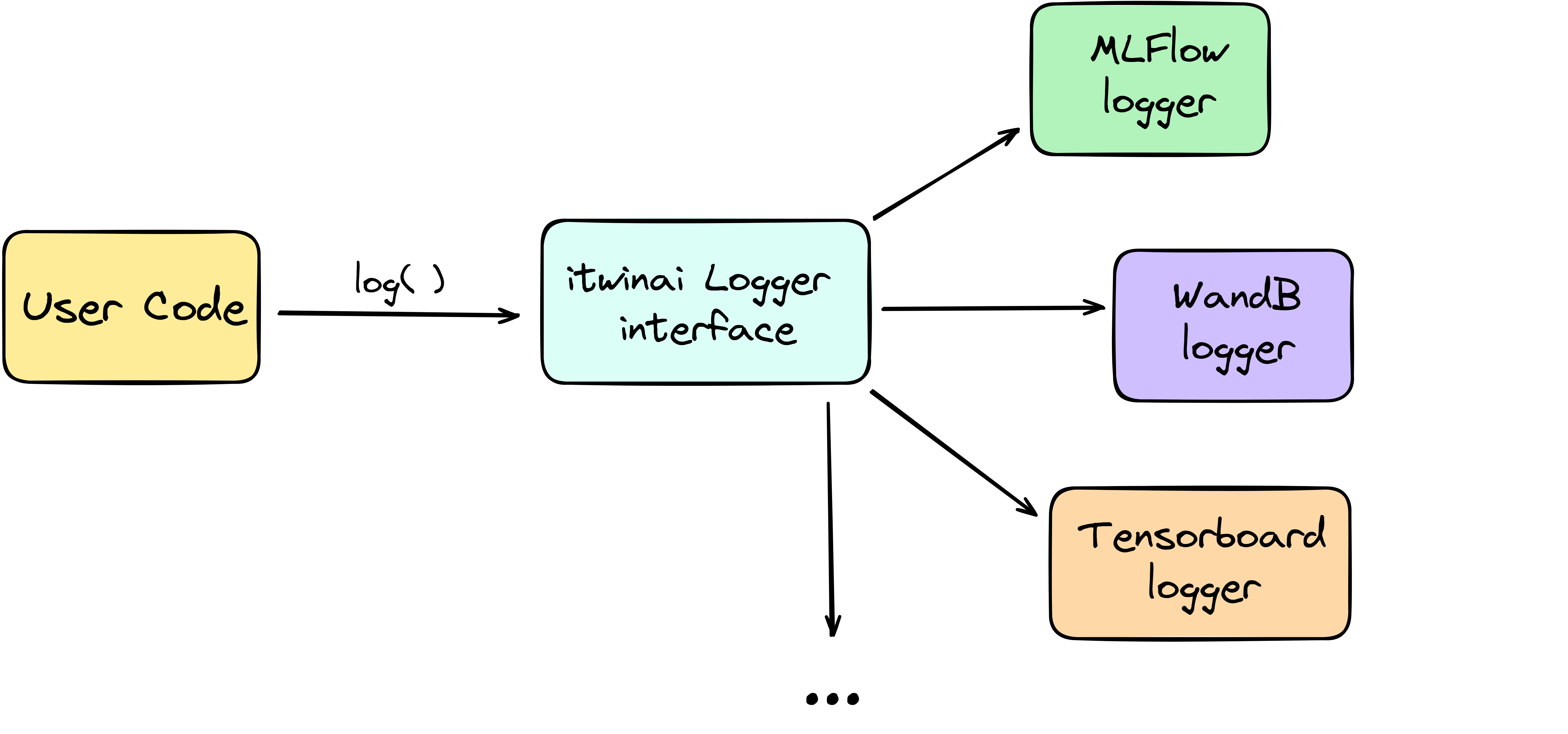
Fig. 1 Informal representation of itwinai logger abstraction.
Getting started with itwinai loggers
itwinai provides a wrapper that allows the user to call a logger in a unified manner regardless of which logger is used on the backend.
The abstraction of logging logic that the itwinai logger provides can avoid redundant code duplication and simplify the maintenance of large-scale projects.
The itwinai Logger provides a unique interface to log any
kind of data trough the log() method. You can use
it to log metrics, model checkpoints, images, text, provenance information, and more.
However, to make sure that the item you want to log is correctly managed, you need
to specify its kind by means of the kind argument.
See itwinai.loggers module documentation for a list of object kinds
that can be logged.
Example of basic usage of itwinai Logger
The following outlines how to concretely use the logger on a toy example:
from itwinai.loggers import MLFlowLogger

my_logger = MLFlowLogger(
    experiment_name='my_awesome_experiment',
    log_freq=100
)

# Initialize logger
my_logger.create_logger_context()

# During PyTorch model training
for epoch in range(100):

    loss_accumulator = .0
    for batch_idx, batch in enumerate(train_dataloader):
        x, y = batch
        pred = my_net(x)
        loss = loss_criterion(y, pred)
        ...
        # Log the loss with "batch" granularity
        my_logger.log(
            item=loss.item(),
            identifier='my_training_loss_batch',
            kind='metric',
            batch_idx=batch_idx
        )
        loss_accumulator += loss.item()
        ...

    epoch_loss = loss_accumulator / len(train_dataloader)
    # Log the loss with "epoch" granularity
    my_logger.log(
        item=epoch_loss,
        identifier='my_training_loss_epoch',
        kind='metric'
    )

# Save model after training
my_logger.log(
    item=my_net,
    identifier='trained_model',
    kind='model'
)

# Destroy logger before exiting
my_logger.destroy_logger_context()
Similarly, you can use itwinai loggers in the itwinai TorchTrainer.
Example of itwinai Logger and TorchTrainer
from itwinai.loggers import WandBLogger
from itwinai.torch.trainer import TorchTrainer

my_logger = WandBLogger(
    project_name='my_awesome_experiment',
    log_freq=100
)

# If needed, override the default trainer
class MyCustomTrainer(TorchTrainer):
    ...

    def train(self, ...):
        ...
        self.logger.log(
            item=some_metric,
            identifier='my_metric_name',
            kind='metric'
        )

# Instantiate the trainer passing some itwinai logger
my_trainer = MyCustomTrainer(
    config=...,
    epochs=100,
    model=my_net,
    strategy='ddp',
    logger=my_logger
)

...

# Start training
my_trainer.execute(train_dataset, validation_dataset)
Logging frequency trade-off
Neural networks parameters are iteratively optimized on small data samples extracted from some training dataset, also called batches. On the other hand, an epoch refers to one sweep through the entire dataset, iterating over all batches that compose it. Thus, an epoch consists of multiple batch iterations.
Logging ML metadata for each batch of each epoch would provide users with the most granular information possible, but it comes at a significant cost in training speed due to the slow process of writing to disk after each batch (a.k.a. I/O bottleneck). Thus, logging every few batches or only once per epoch can be a worthy trade-off depending on the use case.
The log_freq argument in the Logger constructor
allows the user to determine at which batch interval the action of logging is
actually performed, without having to change the training routine.
When an integer is passed as log_freq, the logger will honor the call to the
log() method for each batch, if that batch’s
index is a multiple of the given integer (i.e., batch_id % log_freq == 0).
In all the other cases (i.e., batch_id % log_freq != 0), the logger will ignore
the log()
call in a transparent way for the user.
Example on the functioning of log_freq constructor argument
Should log_freq = 10, the first batch (batch_id = 0) is logged, after which
the 11th batch (batch_id = 10) is logged, after which the 21th batch is logged
and so on.
log_freq can also receive the following string values: "epoch" or "batch".
When set to
"epoch", the logger only logs when called outside of the nested training loop iterating over dataset batches. In other words, the logger only logs ifbatch_idxis not passed as parameter to thelog()method.When set to
"batch", every batch is logged.
Warning
The logger assumes to be outside of the inner training loop (namely, the one
iterating over dataset batches) when the batch_idx argument of the
log() method is set to None or is
simply not given. It is therefore your responsibility to make sure that
batch_idx is always passed to the log()
method when available (i.e., when iterating over batches)!
If you don’t do it, the logger will always log, regardless of what you pass
to the log_freq argument in the Logger
constructor. In other words, if you do not pass the batch_idx argument
to the log() where you should, then you can
run into the situation where you told the logger to only log on epochs,
but then it also logs on batches.
Logging during distributed ML
In distributed workflows, multiple workers perform tasks at the same time. This can sometimes cause problems called race conditions, where the order in which different workers access or modify the same resource affects the software’s behavior. For example, if every worker in a distributed ML job tries to log its local copy of a variable, they might all write to the same file simultaneously, leading to errors. In other cases, if all workers log identical information (like model parameters when using data parallelism), it can result in unnecessary redundancy.
To manage this, each worker in a distributed environment is given a unique number, called its global rank. This is simply an integer going from \(0\) to \(N - 1\), where \(N\) is the total number of workers. A worker’s rank can be accessed from a process using various methods, such as through environment variables set by the torchrun launcher.
The itwinai logger helps control which workers are allowed to log
and, conversely, in which workers calls to the log()
method should be ignored.
Using the log_on_workers argument argument in the
Logger constructor,
you can specify which worker(s) should log based on their global rank.
To make sure each logger knows its worker’s rank, the
create_logger_context() method accepts a rank
integer.
Example of itwinai Logger in a distributed ML job
In this example, we use the itwinai MLFlowLogger to log
only on the worker with global rank equal to 0. In all the other workers, calls
to the log() method will be ignored.
As you can see, the code is very similar to the example above, with the only
differences being in the logger constructor and the
create_logger_context() method.
When using the itwinai TorchTrainer, the rank will
be automatically passed
to the logger’s create_logger_context() method
by the TorchTrainer.
import os
from itwinai.loggers import MLFlowLogger

my_logger = MLFlowLogger(
    experiment_name='my_awesome_experiment',
    log_freq=100,
    log_on_workers=0
)

# Initialize logger, assuming RANK env variable by torchrun launcher
my_logger.create_logger_context(rank=int(os.environ['RANK']))

# During PyTorch model training
for epoch in range(100):

    loss_accumulator = .0
    for batch_idx, batch in enumerate(train_dataloader):
        x, y = batch
        pred = my_net(x)
        loss = loss_criterion(y, pred)
        ...
        # Log the loss with "batch" granularity
        my_logger.log(
            item=loss.item(),
            identifier='my_training_loss_batch',
            kind='metric',
            batch_idx=batch_idx
        )
        loss_accumulator += loss.item()
        ...

    epoch_loss = loss_accumulator / len(train_dataloader)
    # Log the loss with "epoch" granularity
    my_logger.log(
        item=loss.item(),
        identifier='my_training_loss_epoch',
        kind='metric'
    )

# Save model after training
my_logger.log(
    item=my_net,
    identifier='trained_model',
    kind='model'
)

# Destroy logger before exiting
my_logger.destroy_logger_context()
Note
When logging on more than one worker using the same logger, it is responsibility of the user to verify that the chosen logging framework supports multiprocessing, adapting it accordingly if not.
Pytorch Lightning Logger
In addition to the itwinai loggers, itwinai provides a way for users to integrate itwinai
logging functionalities within PyTorch Lightning workflows. Designed to work as a direct
substitute for the PyTorch Lightning logger, the ItwinaiLogger
wraps any existing itwinai logger (e.g., MLFlow or Prov4ML logger) and adapts it to the
PyTorch Lightning interface. By implementing the same methods as the PyTorch Lightning logger,
the ItwinaiLogger allows users to replace the default logger
in their existing code with this wrapper while maintaining compatibility with PyTorch
Lightning’s logging operations, including integration with the ModelCheckpoint callback.
Example of Pytorch Lightning Trainer using ItwinaiLogger
In this example, we see how we can instantiate the
ItwinaiLogger with an itwinai logger instance of our choice
and pass it to a Pytorch Lightning Trainer to use just as any other Lightning Logger.
import pytorch_lightning as pl
from my_models import MyModel
from itwinai.loggers import Prov4ML
from itwinai.torch.loggers import ItwinaiLogger

my_model = MyModel()

my_prov_logger = Prov4ML()
my_lightning_logger = ItwinaiLogger(itwinai_logger=my_prov_logger)

trainer = pl.Trainer(logger=my_itwinai_logger)
trainer.fit(model)
This illustrates the basic structure of instantiating the
ItwinaiLogger and passing it to a
Pytorch Lightning trainer instance.
A more detailed example of the use of the ItwinaiLogger
in an itwinai Pytorch Lightning training pipeline on the MNIST dataset can be found in
Pytorch Lightning
Further references
itwinai.loggersmodule documentation.MLFlow: An open-source logger, MLFlow integrates with most commonly used ML libraries. MLFlow offers tools such as a model registry to aid in version tracking, facilitation of model deployment through MLFlow Models, and strong integration with commonly used ML frameworks.
Weights&Biases: Besides comprehensive tracking of hyperparameters, model metrics, and system performance measures, WandB offers an interactive web-based dashboard that visualises logged metrics in real time.
Tensorboard for TensorFlow: Tensorboard offers a comprehensive suite of visualisation tools including real-time plotting, graph visualisation of neural networks, and image and audio logging besides scalar outputs.
Tensorboard for PyTorch Similarly as for TensorFlow, you can use this variant of TensorBoard when training PyTorch models.